
The route decision starts with two measurements+
The route decision starts with two measurements
A parcel has a scale weight and a physical size. A dense parcel may be expensive because it is heavy; a large, light parcel may be expensive because it occupies transport space. That is why comparing LoloBuy routes with weight alone can produce a misleading result. The useful search question is not simply which route is cheapest, but which route is cheapest after the correct billing rule is applied to the parcel you intend to send.
This guide is narrower than a general shipping-cost guide. It explains how to move from warehouse measurements to a like-for-like route comparison. Prices, route names, service windows and country availability are deliberately not copied into a permanent table. LoloBuy's delivery agreement says rates and delivery times may be adjusted, and its current estimator generates options from the destination and parcel inputs entered at the time of the search.
What the current freight estimator asks for+
What the current freight estimator asks for
Verified platform fact: LoloBuy's public Shipping Fee Estimation page currently asks for a destination country or region and parcel weight in grams. It also provides fields for product category and length, width and height in centimetres. After a query, the current interface can present the shipping line, estimated cost, transit-time field, billing type, parcel limits, item eligibility, billing standard and route features. The page labels the estimate as a reference rather than a final bill.
Editorial workflow: begin with the destination and the best warehouse-stage weight available. Add all three dimensions instead of leaving them blank when the parcel could be bulky. Select the closest product categories because eligibility is content-dependent. Run the same inputs for every route comparison. Changing the weight, dimensions or category between screenshots makes the resulting prices unsuitable for a fair side-by-side decision.
Keep estimated, actual and chargeable weight separate+
Keep estimated, actual and chargeable weight separate
LoloBuy's Help Center describes estimated weight as the warehouse entry weight with original packing plus the carton expected to be used for the parcel. It describes real weight as the parcel weight measured again after the delivery order is submitted and the items are packed. Those are two stages in the parcel record. Neither term, by itself, tells you which weight a particular shipping route will bill.
Chargeable weight is the number used by the route's billing rule. The current estimator distinguishes routes charged by actual weight, routes charged by volumetric weight and routes that compare physical and volumetric weight. For a comparison route, the interface says the greater value controls. Record three columns in your worksheet—estimated actual weight, calculated volumetric weight and displayed chargeable basis—so one number is not accidentally substituted for another.
Read the route's billing method before its price+
Read the route's billing method before its price
A lower headline quote is not meaningful until you know what generated it. On the current estimator, the billing section can identify actual-weight billing, volumetric-weight billing or the need to enter dimensions. For routes that compare the two, the information panel explains that the larger result is used. It also displays the divisor used in that route's volumetric formula. This route-level value is safer than copying a divisor from an old article.
If dimensions are missing, treat any volume-sensitive comparison as incomplete. If a route charges only by actual weight, confirm that the rule shown applies to the entered category and parcel size. If it charges by volume or the larger value, calculate with the exact divisor displayed for that result. Do not assume two routes use the same dimensional convention simply because they appear on the same destination search.
Calculate volume without turning it into a promise+
Calculate volume without turning it into a promise
The current estimator expresses volumetric weight as length multiplied by width multiplied by height, converted with a route-specific divisor. The three measurements must describe the outer packed parcel, not an unpacked product or the seller's retail box alone. Measure the longest points and use consistent units. A soft parcel can change shape after packing, so a warehouse or rehearsal measurement is more useful than a seller estimate.
Consider an editorial example with no platform price attached. Parcel A is 30 × 30 × 20 cm, giving a volume of 18,000 cubic centimetres. Parcel B has the same scale weight but measures 45 × 40 × 30 cm, giving 54,000 cubic centimetres. Entering only the scale weight hides that difference. Enter both dimension sets in the live estimator and let each route's current divisor and billing rule determine whether the larger parcel changes the chargeable weight.
Compare the complete route result+
Compare the complete route result
For each eligible result, save the estimated cost, displayed billing type, chargeable-weight logic, minimum and maximum weight, single-side or combined-dimension limits, transit-time field, product eligibility and route description. Expand the route details rather than comparing the first price row alone. The current interface can also show first-weight, continued-weight, service, fuel, customs-declaration and operation-fee fields where available.
Remove any route that marks the parcel or its contents as non-shippable. Then compare the remaining choices against the same priorities: total current estimate, size tolerance, tracking or service information actually shown, and the consequences of the selected billing method. A cheap result that fails a dimension limit is not an option. A route with a shorter displayed service estimate is not a delivery guarantee, because carrier handling and customs remain variable.
Packaging removal changes both dimensions and protection+
Packaging removal changes both dimensions and protection
Verified platform fact: LoloBuy's current Package removal help page describes a free option during delivery-order submission. It lists several removal levels and says necessary protective packaging can be retained according to the item's situation. The warehouse-weight page also says external dimensions and weight are measured after the product is packaged for stock-in. These statements confirm why packaging choices can change both the scale and volume inputs.
Editorial decision: identify which packaging is disposable shipping material and which packaging protects or forms part of the product. Shoe boxes, presentation boxes and empty space can raise volume, but removing them may reduce crush protection or collector value. Do not select maximum removal merely to chase a smaller estimate. Save the chosen removal instruction, then compare the post-packing or rehearsal measurements when the difference could affect route selection.
Use rehearsal data when the decision is sensitive+
Use rehearsal data when the decision is sensitive
The current LoloBuy application describes parcel rehearsal as a simulation or pre-packing service rather than a real shipment. Its interface says the result can show estimated actual weight, dimensions, volumetric weight and whether charges are expected to follow volumetric or actual weight. It also warns that packaging materials, item condition and value-added services can cause reasonable differences at final dispatch.
Rehearsal is most useful when a bulky parcel sits near a route weight or size limit, when packaging removal could materially change the box, or when splitting one consolidation might unlock a different route. Use its measurements to rerun the route comparison; do not relabel rehearsal output as the final carrier bill. The value lies in replacing a rough seller estimate with a parcel-shaped planning input.
Expect settlement after final packing+
Expect settlement after final packing
LoloBuy's estimated-versus-real-weight article says the parcel is weighed again after the delivery order is submitted and packed. It describes a balance refund when the final calculation is lower and a supplemental-payment process when the logistics charge is higher than the estimate. The current parcel interface separately labels estimated shipping, final shipping after weigh-in, estimated chargeable weight and final chargeable weight.
Save the paid estimate before shipment and compare it with the parcel-detail record afterward. Check whether the physical weight, dimensions, billing method or added-weight unit crossed a threshold. Do not expect every gram of difference to produce a proportional refund: routes can bill in first-weight and continued-weight units. If a balance adjustment is unclear, provide the before-and-after screens and ask support to identify the specific billing step.
US and European buyers should rerun, not reuse+
US and European buyers should rerun, not reuse
Destination is a required estimator input, so a result for the United States should not be reused for the United Kingdom, France, Germany or another European destination. Route availability, product eligibility, dimension limits and tax handling may differ. LoloBuy's delivery agreement also tells buyers to provide accurate parcel declarations and follow the export requirements of the origin and import requirements of the destination.
Keep shipping cost separate from destination tax, duty and carrier handling unless the selected live route explicitly states how those amounts are handled. Do not copy another buyer's declaration or infer tax treatment from a route nickname. For every destination, rerun the current estimator with the actual contents and preserve the route terms shown on the day of submission. This is particularly important when a spreadsheet is shared across buyers in several countries.
Build a comparison sheet that survives changing routes+
Build a comparison sheet that survives changing routes
Use one row per route and one dated snapshot per parcel version. Record destination, item categories, scale weight, length, width, height, cubic volume, route name, billing type, route divisor where displayed, volumetric result, chargeable basis, estimated price, weight limits, dimension limits, eligibility result, transit-time field, packaging choice and date checked. Add a source link to the saved estimator result or screenshot.
If you test a split parcel or different packaging, create another scenario rather than overwriting the first. That makes the decision auditable: you can see whether savings came from lower physical weight, lower volume, a different billing rule or access to another eligible line. A product directory such as FindSpreadsheet can help shortlist items, but it cannot know the final packed dimensions or destination-specific route rules. Those belong in the live parcel comparison.
The final five-minute route check+
The final five-minute route check
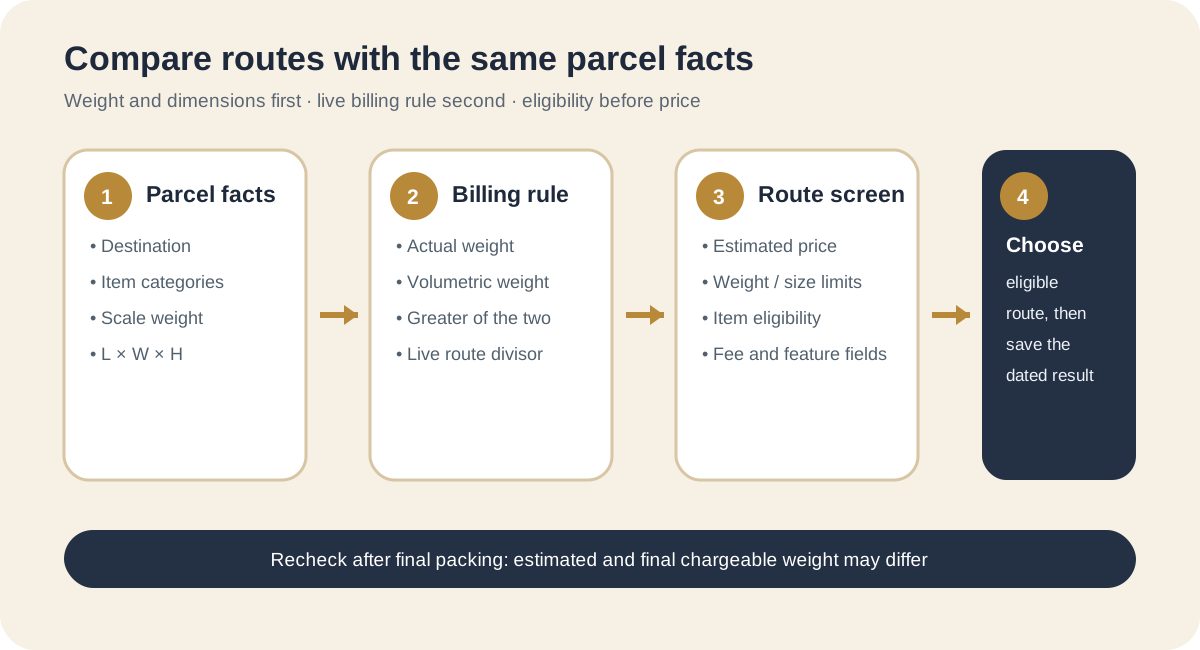
First, confirm that the destination, categories, weight and all three dimensions match the intended packed parcel. Second, remove ineligible routes. Third, identify whether each remaining route bills actual weight, volumetric weight or the greater value. Fourth, expand the details and compare limits, fee fields and route features. Fifth, save the chosen result and packaging instructions before paying.
After packing, compare the final chargeable weight and final shipping amount with the saved estimate. This process does not promise the cheapest route or a fixed delivery date. It does something more useful: it makes every route compete on the same parcel facts, keeps variable platform data tied to a dated source and gives the buyer a clear record when the final measurement differs from the plan.
Sources checked+
Sources checked
Material facts in this guide were checked against the following public sources. Access dates are shown so readers can distinguish the cited record from current platform, carrier and government rules.
- LoloBuy — Shipping Fee Estimation — accessed 1 September 2026
- LoloBuy current freight-estimator application module — accessed 1 September 2026
- LoloBuy Help Center — The estimated weight and real weight — accessed 1 September 2026
- LoloBuy Help Center — Package removal — accessed 1 September 2026
- LoloBuy Help Center — Details on products' weight and warehouse stocking — accessed 1 September 2026
- LoloBuy Help Center — Delivery Service Agreements for Packages Via LoloBuy — accessed 1 September 2026