
Read a status as a stage, not a result+
Read a status as a stage, not a result
A LoloBuy order status tells you where a transaction sits in the shopping-agent workflow. It does not, by itself, prove product quality, predict an international delivery date or confirm that an item is ready to ship overseas. The most useful interpretation is practical: identify who currently controls the next step—the buyer, LoloBuy's purchasing team, the seller, the domestic carrier or the warehouse—and record the evidence you should expect before the status changes again.
This guide uses LoloBuy's public English interface labels and Help Center pages as checked on 28 August 2026. Those sources currently describe a sequence from payment through purchasing, seller dispatch, warehouse receipt and stocking. They also include return and parcel states. Interface wording can change, translations can differ and an account may show a more specific message, so the live order detail should always control an individual order.
The verified shopping-agent sequence+
The verified shopping-agent sequence
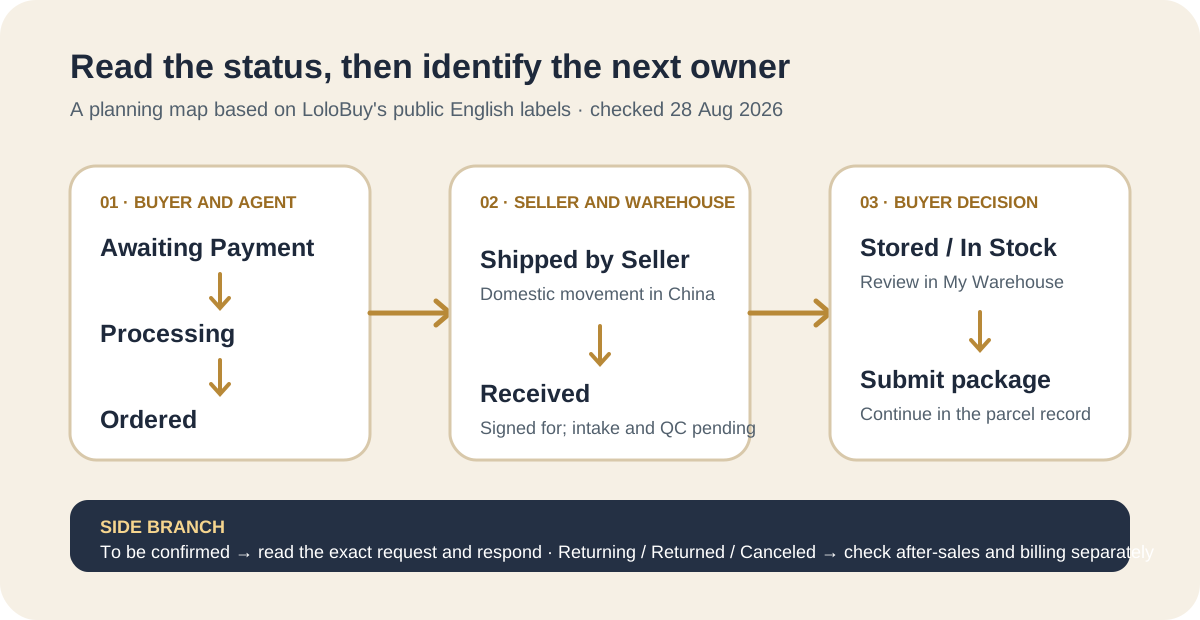
The official status page currently presents the main purchase flow as Awaiting Payment, Processing, Ordered, Shipped by Seller, Received and In Stock. Elsewhere, LoloBuy describes the warehouse-ready state as Stored in warehouse. The current English interface data also contains labels such as To be confirmed, Submitted package, Returning, Returned, Canceled and Completed. These labels describe different branches of the workflow; they are not a single promise that every order will pass through every screen in exactly the same wording.
The flow diagram above is therefore an editorial map, not an official service guarantee. A customized product, pre-order, manual purchase, seller problem, incomplete address, price difference or after-sales request can interrupt the ordinary path. Avoid calculating an overseas arrival date from the first order status. International shipping begins only after the item is stocked, reviewed, selected for a parcel, packed, paid and handed to an eligible route.
Awaiting Payment, Processing and Ordered+
Awaiting Payment, Processing and Ordered
Verified platform fact: LoloBuy defines Awaiting Payment as an order that has been submitted but not paid. Its current Help Center status page says an unpaid shopping-agent order is automatically cancelled after 72 hours. Processing means payment has been confirmed and the purchasing team is buying from the seller; the same page says this step usually takes up to 24 hours. Ordered means the seller has received the purchase order and is preparing to dispatch it.
Editorial advice: save the order number, selected option, submitted price and payment record before waiting. If Processing or Ordered lasts longer than the guidance displayed for the order, first check for a message requesting confirmation, a price adjustment or missing information. Then contact support with the order number and a dated screenshot. Do not describe Ordered as seller shipment: at that stage the official explanation says the seller is still preparing to ship.
Shipped by Seller is domestic movement+
Shipped by Seller is domestic movement
Verified platform fact: Shipped by Seller means the seller has dispatched the package to LoloBuy's warehouse in China. The official status article currently says this domestic movement normally takes three to five days after shipping. That wording is a typical platform estimate, not a delivery guarantee. A seller-created tracking number may exist before the carrier records its first scan, and pre-orders or unusual dispatch arrangements may not follow an ordinary timetable.
Editorial advice: record the domestic tracking number and the date the seller shipment first shows a carrier scan. If the order stops moving, compare the last scan with the status text instead of relying only on the number of calendar days since purchase. A Shipped by Seller order is not available for consolidation, QC approval or international route selection because the warehouse has not yet completed receipt and stocking.
Received does not mean ready in My Warehouse+
Received does not mean ready in My Warehouse
This is the most important distinction in the workflow. LoloBuy's Help Center says Received means its warehouse has signed for the package and is weighing and inspecting the item. The current status overview says QC photos are made available within 24 hours. A separate official answer explains why a Received item may not yet appear in My Warehouse: warehouse confirmation and stocking still need to happen after receipt and inspection.
Treat the published 24-hour statement as current guidance to monitor, not an unconditional promise. If a received item does not progress, save the receipt status, domestic tracking delivery event and time shown in the account. Check for an abnormal-item notice or a confirmation request before escalating. The right support question is specific: ask whether intake, inspection, matching or stocking is pending for the named order.
Pending for Confirmation requires a buyer decision+
Pending for Confirmation requires a buyer decision
Verified platform fact: LoloBuy describes Pending for Confirmation as a state in which some product information must be checked again. Its public answer directs buyers to Shopping Agent Order when confirmation is requested around the purchased stage. When the status arises after delivery to the warehouse, it directs buyers to My Warehouse, where the available decision may be to accept or return the item. The exact reason should be read from the order message rather than guessed from the headline status.
Editorial advice: answer the specific question with evidence from the live seller listing and your saved order selection. Confirm the exact colour, size, model, quantity, price difference or acceptable issue—whichever the message actually identifies. Do not write a broad approval such as “looks fine” when the platform is asking about one mismatch. A dated screenshot of the prompt and your response creates a clearer record if the order later needs after-sales support.
In Stock or Stored in warehouse starts a new decision+
In Stock or Stored in warehouse starts a new decision
Verified platform fact: the status overview describes In Stock as the point after quality checking when the item is placed in personal inventory. LoloBuy's separate Stored in warehouse article says the buyer should then visit My Warehouse and submit delivery to an overseas address. In other words, warehouse stocking ends the seller-to-warehouse stage and opens the buyer's QC, after-sales, storage and parcel-planning stage; it is not the same as international dispatch.
Editorial advice: review the order selection, visible photos, quantity, recorded weight, dimensions and any warehouse note soon after stocking. Mark the item ready, unresolved or route-sensitive. If it is wrong or visibly damaged, investigate the current after-sales option before placing it in a parcel. If it is acceptable, record the live storage countdown and compare it with the arrival schedule of other items rather than assuming you can wait indefinitely.
Submitted package moves the item into the parcel workflow+
Submitted package moves the item into the parcel workflow
The current English interface includes Submitted package as an item status. It indicates that the stocked item has been selected into a parcel workflow, so the next controlling record is the parcel rather than the purchase order alone. LoloBuy's status overview separately describes parcel stages including Awaiting Payment, Processing, Packed and Shipped. A parcel can still need payment, final weighing or an adjustment before it is handed to a carrier.
Save the parcel number and the list of included order numbers at submission. Record the packaging instructions, selected route, estimated chargeable weight and quoted amount. After packing, compare the final weight and any balance request or refund with that record. Do not tell support that an item has disappeared from My Warehouse without checking whether it is already attached to a submitted parcel, rehearsal or after-sales action.
Returning, Returned, Canceled and Completed are different endings+
Returning, Returned, Canceled and Completed are different endings
The current interface lists Returning and Returned as separate item states. Returning indicates an active reverse process; Returned indicates that the return branch has reached a later state. Canceled means the purchase workflow was stopped, while Completed is a closed status. None of these labels alone proves where money has been credited, who paid domestic return freight or whether a refund has reached the original payment method. Those details belong in the after-sales and billing records.
For any closed or reverse status, keep four fields separate: item movement, after-sales decision, refund record and payment destination. Save the request number, reason, evidence submitted, approval message and billing entry. If an expected refund is missing, ask about the exact refund transaction rather than reopening the product-status question. A status spreadsheet is useful precisely because it prevents physical return and financial refund from being treated as the same event.
Build a status log that reveals the next action+
Build a status log that reveals the next action
Use one row per item with columns for order number, seller, exact option, payment date, current status, status-change date, domestic tracking, warehouse receipt, QC decision, confirmation request, after-sales state, storage countdown, parcel number and next action. Add a source screenshot only when the status changes or a decision is requested. This keeps the record compact while preserving the events that matter if an order stalls or a mismatch appears.
The next-action column is more valuable than a colour-coded status alone. Awaiting Payment means pay or allow cancellation. Processing means monitor for a purchasing question. Ordered means wait for seller dispatch while watching messages. Shipped by Seller means follow domestic tracking. Received means allow for intake and inspection while checking for exceptions. Pending for Confirmation means respond. Stored means review and plan. Submitted package means follow the parcel record.
When to contact support+
When to contact support
Contact support when the live order exceeds the current guidance without explanation, domestic tracking shows delivery but LoloBuy has not acknowledged receipt, Received does not progress and no inspection or exception appears, a confirmation prompt is unclear, the warehouse record does not match the purchased option, or an after-sales and billing record disagree. Before contacting support, check account messages, the order detail, My Warehouse, parcel detail and the relevant payment record.
Send one concise evidence set: order or parcel number, exact status text, date and time of the last change, domestic or international tracking number where relevant, screenshot of the mismatch, and the action requested. Avoid unsupported claims about loss, guarantees or universal processing times. The status label tells you where to investigate; the dated account record and response from LoloBuy establish what is happening to the actual transaction.
Sources checked+
Sources checked
Material facts in this guide were checked against the following public sources. Access dates are shown so readers can distinguish the cited record from current platform, carrier and government rules.
- LoloBuy Help Center — Status of the Shopping Agent Orders — accessed 28 August 2026
- LoloBuy Help Center — Why a Received item is not yet in My Warehouse — accessed 28 August 2026
- LoloBuy Help Center — What to do after an item is Stored in warehouse — accessed 28 August 2026
- LoloBuy Help Center — How to respond to Pending for Confirmation — accessed 28 August 2026
- LoloBuy current English interface labels — accessed 28 August 2026