
Fine photos should answer a decision, not create a bigger gallery+
Fine photos should answer a decision, not create a bigger gallery
A LoloBuy warehouse photo request is most useful when one missing view blocks a real decision. You might need to confirm a size label before accepting an item, see whether a detachable accessory is present, read a model marking, or identify which packaging layer can be removed safely. Ordering more images without naming that decision can produce a larger gallery while leaving the important uncertainty untouched. Start with the evidence already attached to the warehouse item, then identify the single observable fact you still need.
This guide separates verified platform facts from editorial advice. LoloBuy's current interface and Help Center pages were checked on 27 September 2026. They describe standard inspection, standard photos and a warehouse action labelled Fine photo in English. The underlying module and some older help text also use HD or Detailed Photo terminology. The request-writing framework below is independent guidance for US and European buyers; it does not promise a particular angle, price, turnaround time, result or acceptance of a return.
Know what standard inspection already covers+
Know what standard inspection already covers
LoloBuy's Standard inspection service page says the warehouse checks appearance information such as style, quantity, colour, size and model, along with visible damage or defects. It currently says standard quality inspection includes 3–6 photos and is a free service. It also describes a no-inspection option in which the warehouse checks for restricted products but does not verify the product or provide quality-inspection photos. Check the actual order choice and warehouse record before assuming your item received the standard service.
The same source sets important limits. Sealed products and non-clothing, non-bag and non-shoe products with seals or sealing tags may not be opened; the warehouse may rely on the outer package to identify them and check visible damage. The separate Scope of Inspection page says professional products such as appliances, digital goods and electronic accessories are outside inspection for authenticity, function and quality. A clean standard photo therefore does not prove that an electronic device works, that a material is genuine or that a sealed box contains every advertised component.
Use the existing gallery before buying another view+
Use the existing gallery before buying another view
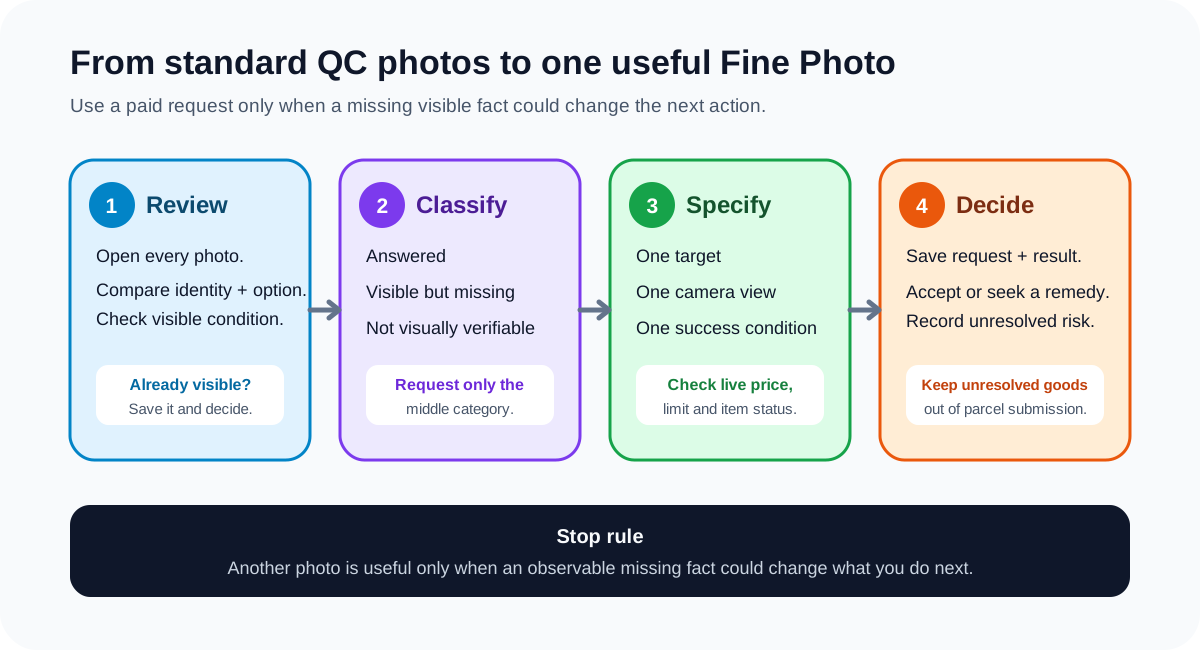
Open every standard image at full size and follow a fixed pass: identity, selected option, quantity, overall condition, labels, accessories and packaging. Compare the gallery with the order selection and saved seller page, not with a product nickname from a spreadsheet. If the required fact is already visible in one frame, save that image and make the decision. A second photograph of the same area may add confidence, but it is not automatically new evidence.
Mark each question as answered, observable but missing, or not visually verifiable. An unreadable wash label is observable but missing and may justify a close straight-on image. Battery health is not visually verifiable from an exterior image, so another photograph is unlikely to solve it. This three-way classification is the main guardrail against paying for photographs that cannot answer the underlying question. It also helps you describe a genuine gap without implying that warehouse staff should perform a technical test outside the published inspection scope.
Understand the current Fine Photo order form+
Understand the current Fine Photo order form
In the current English warehouse interface, the stored-item action is labelled Fine photo while the photo viewer distinguishes ordinary and HD images. The live Fine Photo module creates a separate line for each requested photo. Each line requires a text instruction, accepts one optional reference image and limits the instruction field to 256 characters. The form allows additional lines only up to a live purchase limit and calculates the total from the current unit price. Those values come from live platform configuration rather than fixed text in the article.
Because the price and order limit are dynamic, this guide does not publish a fee or maximum number of requests. Open the Fine photo action for the specific stored item and review the displayed total immediately before confirmation. Availability can also depend on item status: the current program hides the action for several states, including items already submitted to a parcel, returned, cancelled or finished. If the action is absent, check the item's state and use authenticated support rather than relying on an old screenshot or fee quoted by another buyer.
Write one observable instruction per photo+
Write one observable instruction per photo
A strong request names the target, view and success condition. For example: “Photograph the inside size label straight on so every line is readable,” or “Place a ruler across the chest from pit to pit, with both ruler endpoints visible.” For a set, write “Arrange all included pieces in one frame so the quantity can be counted.” For packaging, specify “Show the retail shoe box, molded insert and dust bag together before removal.” These instructions describe a camera result that a warehouse worker can reproduce.
Avoid requests such as “check quality,” “is this authentic?” or “take better photos.” Quality is not one observable attribute, authenticity is not established by a warehouse image, and better has no defined angle or detail. Do not combine five unrelated tasks in one 256-character line. If two views are independently necessary, order two lines and state one goal in each. Add the optional reference image when placement or framing is difficult to explain, but annotate or crop it so the relevant area is obvious rather than sending a full seller collage.
Match the request to the product and decision+
Match the request to the product and decision
For clothing, ask for a named measurement with endpoints visible, a readable size or care label, or a straight view of a print area. For shoes, request the pair together for symmetry, the size tag, insole measurement or a specific seam. For bags and accessories, focus on dimensions, fastening points, internal compartments and included pieces. A photograph can show visible alignment, marks and labels; it still cannot guarantee fit, fabric composition, long-term durability or how an item will perform after use.
For electronics, keep the request to observable identifiers: model label, plug type, connector, included cable, seal condition or visible exterior damage. Do not treat a power-on screen as a complete functionality test unless the account explicitly offers and records an appropriate supported service. For collectibles, ask whether the seal and outer box are intact before requesting an interior view; breaking a seal may change condition or return eligibility. When the next step is package removal, photograph the layers you may want to keep before authorizing an irreversible change.
Build a before-and-after evidence pair+
Build a before-and-after evidence pair
Save the order selection, seller listing and original standard gallery before submitting a Fine Photo request. Give the request a short evidence name in your own ledger, such as “size-label-readable” or “left-heel-close-up.” After the new image arrives, store it beside the exact instruction and record whether it answered the question. This creates a before-and-after pair that is easier to interpret than an unlabeled folder of images and helps prevent the wrong picture being attached to a return discussion.
If the image reveals an objective mismatch, preserve the relevant order line, option, standard image, Fine photo and warehouse note before opening the return or exchange workflow. State the discrepancy neutrally: the ordered size was 42 while the photographed label shows 41, or the listing showed two accessories while the complete count frame shows one. Do not edit away surrounding context or add claims the image cannot prove. The separate return-evidence guide explains how to package that record for an after-sales request.
Do not let photo ordering erase a deadline+
Do not let photo ordering erase a deadline
A stored item may be waiting on a seller return window, a warehouse countdown, another order or a planned parcel. Record the request date and the live deadlines shown in the account. LoloBuy's current public material does not give this guide a universal Fine Photo completion time, so do not plan around an invented promise. If an urgent return depends on the image, contact authenticated support and preserve the response rather than waiting silently for a deadline to pass.
Keep the item out of a submitted parcel while the photo question could still lead to a return, exchange or packaging change. Once the evidence is sufficient, make an explicit decision: accept and mark ready, request a supported remedy, or accept the unresolved risk. Repeatedly buying new angles without a decision rule can consume both time and money. A useful stop rule is simple: order another photo only if a missing observable fact could change what you do next.
A practical LoloBuy Fine Photo checklist+
A practical LoloBuy Fine Photo checklist
First, review every standard image and compare the item with the exact paid option. Write the decision you are trying to make. Classify the missing fact as answered, observable but missing, or not visually verifiable. If it is observable and material, open the current Fine photo action, check the live unit price, total, order limit and item status, then write one target, one view and one success condition per line. Attach one focused reference image only when it improves framing.
After delivery of the requested image, save it with the instruction and decide promptly. Link any objective mismatch to the original order evidence before using the live return or exchange channel. Keep uncertain goods out of parcel submission and avoid irreversible packaging changes until the question is settled. This workflow does not turn warehouse photography into product certification. It makes each paid request testable, keeps platform facts separate from buyer judgment and gives a US or European buyer a cleaner evidence trail before international shipping.
Sources checked+
Sources checked
Material facts in this guide were checked against the following public sources. Access dates are shown so readers can distinguish the cited record from current platform, carrier and government rules.
- LoloBuy current web application — Warehouse photo labels and service entry — accessed 27 September 2026
- LoloBuy current Fine Photo order module — accessed 27 September 2026
- LoloBuy Help Center — Standard photo service — accessed 27 September 2026
- LoloBuy Help Center — Standard inspection service — accessed 27 September 2026
- LoloBuy Help Center — Scope of Inspection — accessed 27 September 2026
- LoloBuy Help Center — Product weight and warehouse stocking — accessed 27 September 2026