
Use manual ordering when the link cannot be parsed+
Use manual ordering when the link cannot be parsed
A LoloBuy manual order is a structured way to submit a product whose marketplace page does not populate a normal product form. The current purchase guide says that buyers can paste links from several China shopping channels and that a ‘Fill in A Shopping Agent Order’ page can appear when the platform cannot capture the listing normally. This is different from entering a random description and asking an agent to find something similar. The buyer supplies the source link and transaction details that the purchasing agent will use to contact the seller.
Manual entry also moves more responsibility to the buyer. An automatically parsed page can expose selectable variants and seller data, while a manual form depends on the text, price and freight you enter. Treat the form as a purchase instruction, not a search query. Before submitting, preserve the current listing and make every material choice explicit. The goal is to let another person identify one seller page, one exact variant and one expected quantity without interpreting a nickname or guessing from a collage.
What the current LoloBuy form actually asks for+
What the current LoloBuy form actually asks for
Verified platform fact: the current English Manual Order form requires a product link beginning with http or https, a product name, product specifications, commodity price, freight to warehouse and purchase quantity. Its program calculates the displayed total from the entered unit price, quantity and domestic freight. The same screen offers Add to Cart and Buy Now after the user accepts the applicable disclaimer. These are current interface fields, not a promise that every submitted product will be accepted or that the entered amount will be final.
The page also provides an area for other information and supports reference images in the submitted product data. Use those fields only to clarify the listing. A reference photo does not override a contradictory URL, and a remark does not create a seller option that is absent from the source page. Save a screenshot of the completed form before checkout. It should show the URL, product title, specification text, unit price, domestic freight, quantity and total so a later request for clarification can be compared with exactly what you sent.
Read the special-platform warning before paying+
Read the special-platform warning before paying
LoloBuy's current manual-order disclosure gives examples of third-party special-platform orders, including WeChat stores, Xianyu, Yupoo and Xiaohongshu. It says such orders may involve additional service fees, may be unavailable for purchase, may carry delivery risk, may not receive the same return or exchange service as a Taobao order, and may receive appearance-only checking. The wording is conditional. It does not establish one universal fee or say that every listing on a named platform has the same rules.
Editorial advice: record the source type in your spreadsheet and stop if the transaction depends on a benefit the seller has not documented. Ask for the live fee, purchase eligibility and after-sales position for the specific order rather than copying a rate or promise from another buyer. Avoid sending money outside the authenticated LoloBuy workflow. If a seller page is private, expired or visible only inside an app, capture the seller identity, listing title, option, price and timestamp while you still have access, then expect the agent to request clarification or reject the order if it cannot be verified.
Turn a listing into an unambiguous specification+
Turn a listing into an unambiguous specification
Start with the exact seller wording, then translate only enough to make the selection clear. For apparel, record colour, seller size code and any version or batch name. For shoes, include the seller's size system rather than silently converting it. For sets, list every expected piece and the advertised quantity. For electronics or accessories, record the model, connector, plug, colour and included components that are visible on the listing. If the seller uses numbered option images, include both the number and a short description so one missing image does not erase the choice.
Keep one decision per line: product, option, quantity and a short seller instruction. Do not write ‘best quality,’ ‘same as photo’ or ‘normal size’ when the page contains several versions. Link any supporting screenshot to the saved source URL and date. A product directory can help you discover a lead, including a restrained browse through FindSpreadsheet, but return to the live seller page before entering the manual form. The directory title or thumbnail is not transaction evidence and should never replace the current listing.
Separate the entered price from the verified checkout+
Separate the entered price from the verified checkout
The price fields are buyer-supplied inputs, not a locked seller quotation. Enter the current unit price for the selected option and the seller's current freight to the LoloBuy warehouse. Do not hide a surcharge inside the product title or multiply the unit price before entering quantity. Save visible discount or free-shipping evidence instead of assuming an agent can reproduce an expired promotion. If the currency or unit on the source page is unclear, pause and ask through the order enquiry channel described in LoloBuy's purchase guide.
LoloBuy's public balance-payment help page says a paid Shopping Agent order can still require an outstanding amount when the seller's price changes, especially in relation to Chinese domestic delivery. Therefore, preserve both the manual form and the later verified order. If a top-up appears, match the order number, seller page, selected option, earlier amount and stated reason before paying. A changed amount is not automatically an error, but it needs a traceable explanation. Keep product price, domestic freight, service charge and later international shipping in separate spreadsheet columns.
Check eligibility before creating a sunk cost+
Check eligibility before creating a sunk cost
A purchasable domestic listing is not automatically eligible for international delivery. LoloBuy's Product Scope page distinguishes ordinary categories from prohibited or sensitive goods and notes that customs sensitivity varies by destination. The current restricted-items and route screens must control the real parcel decision. Before placing a manual order, describe batteries, liquids, powders, magnets, pressurized components, food, plants or other relevant characteristics accurately and ask whether the item can be purchased, stored and shipped to the intended country.
Do not solve an eligibility problem by shortening the product name or omitting a characteristic. Record the destination, product category, restriction check, response date and the route screen you plan to revisit at warehouse stage. A manual order accepted for purchasing still does not guarantee that every shipping line will carry it. If no suitable live route appears after storage, the buyer may face a return or another handling decision. That is why eligibility belongs before payment, not after an attractive item has already reached the warehouse.
Use warehouse evidence within its real limits+
Use warehouse evidence within its real limits
LoloBuy's purchase guide says purchased items move through inspection and storage and can then be viewed in My Warehouse. Its separate Scope of Inspection page defines important limits: warehouse checking mainly covers visible information such as style, quantity, colour, size and model. Sealed goods and certain non-apparel items may be checked from outer packaging without being opened. Professional goods such as appliances, digital products and electronic accessories are outside inspection for authenticity, functionality and quality.
Compare the warehouse record with the manual instruction, not merely with a remembered picture. Confirm the product, option, quantity, visible accessories, external condition and labels that can reasonably be seen. If one observable fact is missing, request one precise additional image when the current account offers that service. Do not turn a clear warehouse photo into proof of authenticity, internal components or future performance. Mark every important claim as confirmed visually, still unverified or outside the published inspection scope.
Handle a mismatch before parcel submission+
Handle a mismatch before parcel submission
If the item or order differs from the manual form, save the submitted URL, specification text, price record, seller page, agent message and warehouse images before opening an enquiry or after-sales request. Describe one objective mismatch at a time: wrong colour, wrong seller size, missing unit, changed price or a product that could not be purchased. Avoid editing the evidence into a collage that removes dates or identifiers. A short, chronological record lets support distinguish a form-entry error, seller substitution, purchasing clarification and warehouse issue.
LoloBuy's public cancellation and refund page separates options by order status. Early orders can follow a cancellation path, while purchased or shipped orders can require seller confirmation, a return request or domestic return movement. It also makes clear that seller approval is not guaranteed in later stages. Use the controls shown for the actual order status and keep the item out of an international parcel while the outcome is unresolved. Never publish a seller-dependent processing estimate as a guaranteed deadline.
A spreadsheet-ready manual order checklist+
A spreadsheet-ready manual order checklist
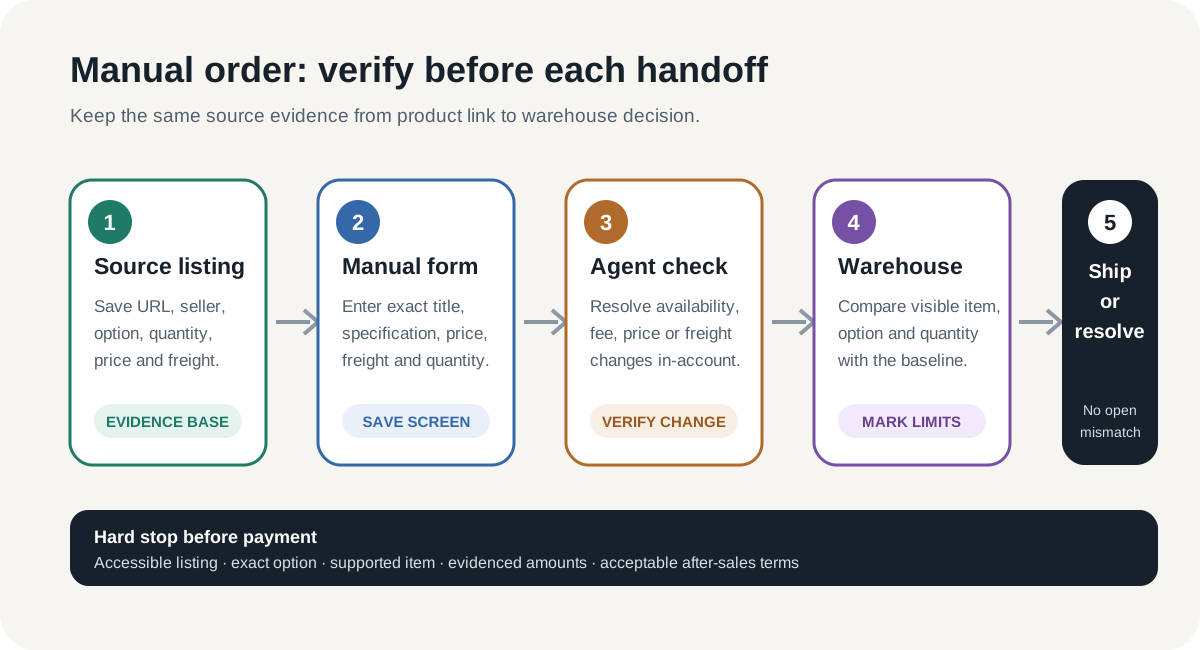
Create one row with source URL, seller or shop, source platform, listing capture date, product title, exact option text, quantity, unit price, domestic freight, evidence link, restriction check and intended destination. At manual submission, add the LoloBuy order number, form screenshot, accepted disclaimer, displayed total and any service-fee notice. During purchasing, log each clarification, price or freight change and the authenticated response. At warehouse intake, attach the visible identity check, QC decision and unresolved limitations.
Use a hard stop before each payment: the listing is accessible, the seller and item are identifiable, the variant text is unambiguous, all entered amounts have evidence, shipping eligibility has been checked, and the current after-sales position is acceptable. After storage, compare the received item with that same baseline before consolidating or removing packaging. This workflow cannot make a private seller reliable or guarantee a return, route or product quality. It does make a manual LoloBuy order auditable from product lead to warehouse decision.
Sources checked+
Sources checked
Material facts in this guide were checked against the following public sources. Access dates are shown so readers can distinguish the cited record from current platform, carrier and government rules.
- LoloBuy — current English interface and manual-order disclosures — accessed 5 October 2026
- LoloBuy — current Manual Order form module — accessed 5 October 2026
- LoloBuy Help Center — How to purchase on LoloBuy? — accessed 5 October 2026
- LoloBuy Help Center — Product Scope in Shopping Agent Service — accessed 5 October 2026
- LoloBuy Help Center — Scope of Inspection — accessed 5 October 2026
- LoloBuy Help Center — Why a paid Shopping Agent order may require a balance payment — accessed 5 October 2026
- LoloBuy Help Center — Can Shopping Agent orders be cancelled or refunded? — accessed 5 October 2026