
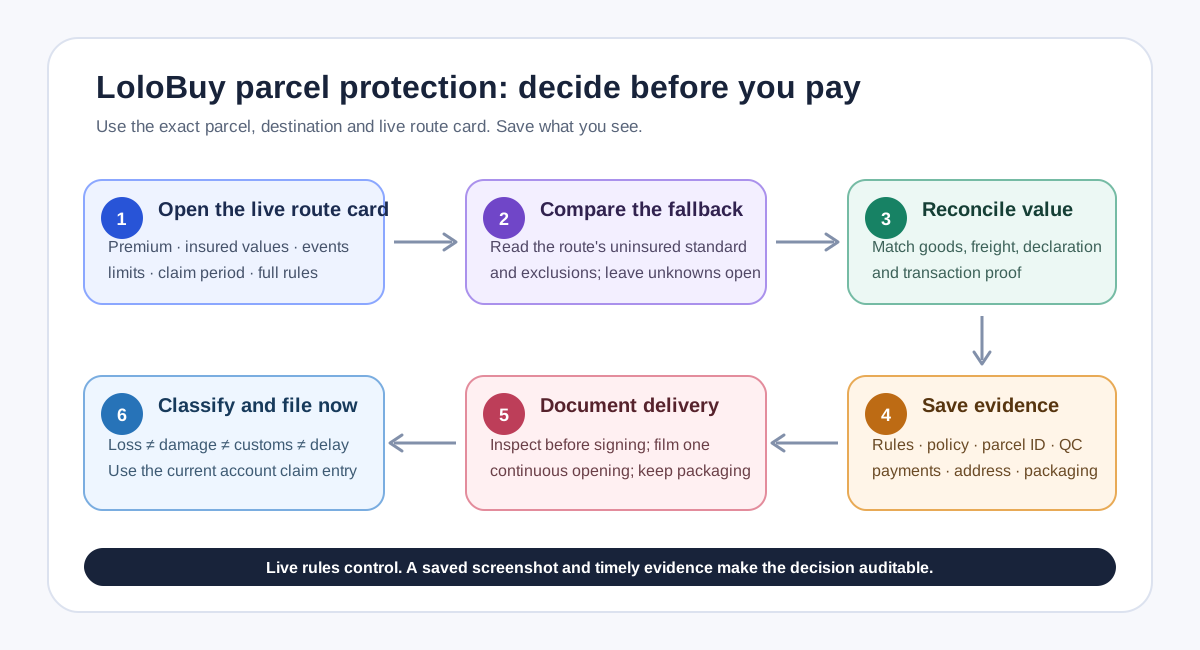
Treat parcel protection as a route-specific contract, not a checkout badge+
Treat parcel protection as a route-specific contract, not a checkout badge
LoloBuy's current web application includes a protection product labelled "Secure-Ship." On the parcel-submission screen, the interface can show a purchase switch together with premium, rate, insured goods value, insured international shipping fee, coverage and detailed rules. The same application contains claim categories for parcel loss, item damage or loss, customs seizure and delay. Those labels describe what the current interface is built to display; they do not prove that every route covers every event.
This guide separates verified platform facts from editorial planning advice. The facts come from LoloBuy pages and current site modules accessed on 17 September 2026. The comparison framework is advice for US and European buyers. No fixed premium, payout, country, route, review time or successful-claim rate is promised here. Open the live route card for the exact parcel and destination, read its detailed rules, and keep a dated copy before paying. If the card is missing or unclear, ask support rather than assuming that the word protection means all-risk insurance.
Resolve the conflict between the live interface and the older help page+
Resolve the conflict between the live interface and the older help page
One public LoloBuy help article about uninsured lost or damaged parcels still says insurance services will be introduced soon. That statement conflicts with the current web application, which now presents Secure-Ship selection, policy information and a claim workflow. The sensible interpretation is that the help article has not been fully aligned with the newer interface. It should not be used to conclude that protection is unavailable, and the application should not be used to infer benefits that are absent from the detailed route rules.
Record both pieces of evidence in your decision sheet. For the selected line, save the route name, destination, date, coverage label, premium, insured goods value, insured freight value, listed events, maximum payout if shown, claim period if shown and the full rules. If a number or term appears only after login, treat the account screen as the transaction record and not as a permanent public price. This prevents a future spreadsheet user from applying today's route-specific protection to another route, country or submission date.
Build two comparable parcel scenarios+
Build two comparable parcel scenarios
Start with the packed parcel, not the value of the shopping cart. List each warehouse item, paid product value, quantity, condition evidence, declared description, declared value, final parcel weight, dimensions and international freight. Then create two columns: Secure-Ship as displayed for the chosen line, and the applicable uninsured compensation rule. Compare covered events, excluded goods, evidence requirements, filing window, compensation basis, payout destination and unresolved questions. Mark a field unknown when the live rules do not answer it.
LoloBuy's delivery agreement says the declared value entered by the buyer is used as a value basis for a compensation claim, and suggests purchasing SuperCare Plus when better protection is needed. The current interface instead uses the Secure-Ship name. Because product naming and terms may evolve, do not treat those labels as automatically identical without checking the live rule text. Declare accurately and keep the item-level basis. Deliberately reducing a declaration can also reduce the documented value available when a loss must be assessed, while inaccurate declaration can create customs and eligibility problems.
Understand what the uninsured policy actually says+
Understand what the uninsured policy actually says
LoloBuy's current public uninsured-compensation page says a parcel lost or damaged without purchased insurance is handled under the compensation standard for the corresponding shipping route. It also says compensation for shipping cost is limited to the actual shipping cost paid, including vouchers. That is not a universal promise to repay the full goods value or freight. The route standard, exclusions and proof determine the result, so a buyer should capture the route's compensation information before submission rather than discover it after an incident.
The same page excludes several situations, including recipient-caused loss, failure to collect, incorrect recipient information, tracking that shows successful delivery, failure to cooperate with customs, post-delivery theft, prohibited or restricted contents, certain force-majeure events and claims without supporting documents. It also lists categories described as non-compensable. Read the current list before relying on either protection path. If an item is sensitive, fragile, valuable or difficult to prove, first check whether the route accepts it and whether the live Secure-Ship rules cover it; a paid switch cannot make prohibited contents eligible.
Use insured value as a reconciliation task+
Use insured value as a reconciliation task
The current submission interface has separate fields for insured goods value and insured international shipping fee. Compare both with the underlying order and parcel record. For goods, total the amounts actually paid for the items included in that parcel, then preserve invoices or transaction screenshots. For freight, preserve the final international charge and any later adjustment. Do not count coupons, domestic seller freight, value-added services or taxes in a coverage bucket unless the live rules explicitly include them.
A combined parcel needs extra care. Confirm that every listed item appears in the insurance calculation and that quantities match the warehouse selection. If a high-value item is split into another parcel, rebuild the comparison rather than allocating the previous premium informally. If the displayed insured value differs from your documents, pause before payment and ask which figure controls. A spreadsheet should show the source of every amount and the date observed. It cannot expand the policy limit, replace the platform record or prove value by itself.
Prepare the evidence before the parcel leaves China+
Prepare the evidence before the parcel leaves China
For each parcel, create an evidence folder containing the parcel number, warehouse item numbers, original product transactions, selected route, declaration, packed weight and dimensions, QC images, packaging-service choices, payment record and saved protection rules. Add the recipient name, complete address and working phone number exactly as submitted. LoloBuy's uninsured policy says incorrect recipient information and failure to collect can remove a loss from compensation, so address review is part of protection planning rather than an administrative afterthought.
Also decide how delivery will be documented. LoloBuy's receiving notice tells buyers to inspect the outer packaging, seal and any obvious weight difference before signing; visibly damaged parcels should be checked with the carrier and accepted with remarks or rejected where appropriate. Arrange for the recipient to record the unopened parcel from all sides and make one continuous unboxing video. Tell household members not to discard the label, carton, internal packing or damaged goods. Evidence created before and during opening is far stronger than a reconstruction after the packaging has disappeared.
Separate a loss claim from a damage claim+
Separate a loss claim from a damage claim
A lost-parcel claim requires a clean tracking timeline and carrier evidence. LoloBuy's uninsured page lists parcel coding information, screenshots showing ownership and value, a loss certificate from the logistics carrier and other credentials recognized by LoloBuy. Save the first acceptance scan, later scans, enquiries and any written carrier conclusion. A long tracking gap alone may not be a formal loss certificate. Use the parcel detail page and authenticated support channel, and keep every case number and response date.
For damage, LoloBuy's page requires a complete, unedited, continuous unpacking video that begins before opening and clearly shows the damaged or defective item. It also lists the parcel code, proof of value, a detailed damaged-property list, scene and item photos, and in some cases an inspection report. The current claim module accepts evidence uploads and lets users add documents when more information is requested. Do not edit away pauses, discard the product or repair it before instructions arrive. Record damage by item, model, quantity and visible extent without claiming a cause you cannot prove.
File immediately because the public timing language is inconsistent+
File immediately because the public timing language is inconsistent
The public pages do not present one clean after-sales deadline. The uninsured policy says damage claims must be made within three days of receipt and gives a separate period for lost claims tied to a carrier loss certificate. The receiving notice mentions evidence within two working days, feedback within 72 hours and broad language about responsibility after normal sign-off. Another parcel after-sales page mentions seven days after signing or 45 days from shipment, then warns that an application may not be accepted after more than three days following delivery.
Do not choose the longest number. Treat the earliest visible deadline as the operational target: document the parcel at delivery and submit through the current account workflow immediately. LoloBuy's after-sales page directs users to My LoloBuy, then Parcels, then Apply After-sales for the relevant order. The present claim module also supports a policy-based File Claim action when available. Use the route or policy claim entry shown in the account, describe the event precisely, upload the first evidence set and save confirmation. Ask support which deadline and channel govern that parcel.
Do not confuse customs, carrier and post-delivery risks+
Do not confuse customs, carrier and post-delivery risks
Loss, damage, customs seizure, delay and theft after delivery are different events. The current LoloBuy application contains those first four claim labels, but the types actually available are retrieved for the specific insurance order. Do not assume that seeing a label in the website program means the selected policy accepts it. The uninsured page says customs problems caused by failure to cooperate or pay required charges are excluded, and it places customs risk for some goods on the buyer. Its exclusions also say parcels stolen or lost after delivery are not covered.
When tracking shows a customs event, follow the official request, keep payment and submission records, and ask whether the parcel needs information rather than immediately calling it lost. When tracking shows delivered but the recipient cannot find it, contact the last-mile carrier and delivery location at once; do not rewrite the event as in-transit loss. If a parcel is returned, separate outbound loss from return freight and reshipment decisions. Accurate event classification keeps the evidence relevant and reduces contradictory statements across the carrier, customs authority and LoloBuy case.
A practical LoloBuy insurance decision checklist+
A practical LoloBuy insurance decision checklist
Before paying, confirm that the route accepts every content category, open the current Secure-Ship rules, compare insured goods and freight values with the parcel record, read exclusions, capture the premium and listed claim period, and verify the recipient details. Compare that offer with the route's uninsured compensation standard. Buy protection only on the basis of the displayed contract, not because a forum post used the same route name. If important fields are missing or contradictory, ask support and preserve the answer before submission.
After payment, store the policy number or protection record with the parcel ID and transactions. At delivery, inspect and film before opening, keep all packaging, and classify the event accurately. File through the current account entry immediately, upload the evidence you already prepared and save every acknowledgement or request for more material. This process cannot guarantee approval or a particular payout. It gives US and European buyers an auditable path from route choice and insured value to timely evidence—a stronger basis for a claim than a generic spreadsheet cell marked ‘insured.’
Sources checked+
Sources checked
Material facts in this guide were checked against the following public sources. Access dates are shown so readers can distinguish the cited record from current platform, carrier and government rules.
- LoloBuy current web application — Secure-Ship interface labels and route fields — accessed 17 September 2026
- LoloBuy current parcel-submission module — route-specific Secure-Ship selection — accessed 17 September 2026
- LoloBuy current claim module — claim types, evidence upload and claim records — accessed 17 September 2026
- LoloBuy Help Center — Compensation policy for uninsured lost or damaged parcels — accessed 17 September 2026
- LoloBuy Help Center — Delivery Service Agreement for parcels — accessed 17 September 2026
- LoloBuy Help Center — Notices for receiving a parcel — accessed 17 September 2026
- LoloBuy Help Center — How to apply for parcel after-sales — accessed 17 September 2026