
A forwarding parcel needs an identity before it needs an address+
A forwarding parcel needs an identity before it needs an address
LoloBuy forwarding is designed for goods that you or another sender purchase and send to the platform's China warehouse. The critical task is not simply copying a Chinese address. It is creating an approved forwarding order, linking that record to the seller's domestic shipment and giving the warehouse enough matching data to identify the incoming package. When those steps are reversed, a delivered carton can exist physically without appearing as a usable item in My Warehouse.
This guide separates verified platform facts from editorial workflow advice. Platform facts come from LoloBuy pages and the current website program accessed on 21 September 2026. The spreadsheet fields and evidence routine are practical advice for US and European buyers. No warehouse location, storage allowance, inspection result or processing time is promised here. Always use the address and instructions shown inside the signed-in account for the approved order on the day the sender prepares the label.
Submit and approve the forwarding order before the seller ships+
Submit and approve the forwarding order before the seller ships
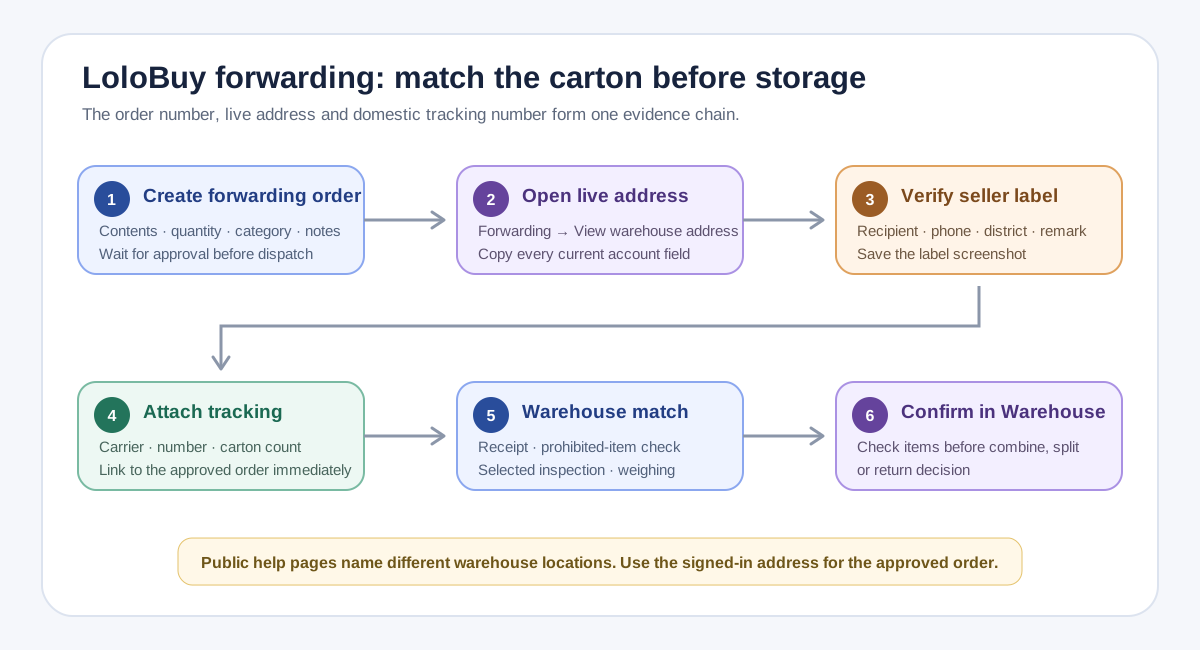
LoloBuy's forwarding guidance tells users to enter the product name or link, choose the category, add quantity and notes, select the warehouse and any needed additional service, then submit the forwarding order for verification. That record should be created before the parcel moves. Save the order number and a screenshot of the declared contents. If one domestic carton contains several products, list the contents and quantities clearly rather than describing the whole shipment as a generic package.
After approval, the guidance says to buy from the seller or arrange the sender and ship to the LoloBuy warehouse. Build a forwarding ledger with one row per domestic tracking number. Include the LoloBuy order number, seller or sender, product description, quantity, declared category, domestic carrier, tracking number, dispatch date and expected carton count. This small step prevents a common reconciliation problem: one forwarding order describing two cartons while only one tracking number is attached, or two orders competing for the same number.
Copy the live address because LoloBuy's public pages conflict+
Copy the live address because LoloBuy's public pages conflict
The public address instruction says to sign in, open Forwarding and select View the warehouse address. That is the safe source. The help library is internally inconsistent about the location name: the general guidance refers to a Guangdong warehouse and says there is currently one address, while the separate address article refers to a Quanzhou warehouse. Both pages say the forwarding service accepts parcels sent from Mainland China and does not accept parcels originating overseas, Hong Kong, Macao or Taiwan.
Do not resolve that inconsistency by choosing the location name that looks newer or copying an address from a forum, old screenshot or spreadsheet. Wait for order approval, open the current address in the account and copy every field exactly: recipient, phone, province, city, district, street details, postcode and any user-specific identifier or remark. Ask the sender to return a screenshot of the completed label before dispatch. Compare it character by character with the live account entry, then save both images with the order row.
Attach the domestic tracking number immediately+
Attach the domestic tracking number immediately
LoloBuy's guidance says that after dispatch you should enter the complete delivery information on the corresponding forwarding order immediately and confirm the correct warehouse. The order then changes to a shipped state. Treat the domestic tracking number as the join key between the online record and the physical carton. Copy it from the carrier receipt rather than typing from memory, preserve leading digits and confirm that the carrier selected in the account matches the label.
If the seller splits the order, add each tracking number through the current interface or contact support before arrival when the form does not support the actual shipment pattern. If several sellers use one consolidator, retain both the seller-to-consolidator reference and the final warehouse-bound tracking number. Save the carrier's acceptance scan and delivery proof. A status marked delivered by the Chinese carrier shows movement to an address; it does not by itself show that LoloBuy matched, inspected, weighed and stored the right contents.
Understand what happens to an unmatched package+
Understand what happens to an unmatched package
LoloBuy's current help page says a package arriving without a corresponding order or with incomplete logistics information is accepted as an abnormal parcel. The page currently states that these abnormal parcels are kept for 60 days and later processed as overdue. It also says that after the user submits the order and completes the delivery tracking number, the warehouse can locate the package and place it in storage. This is a recovery route, not a recommended operating method.
If a domestic carrier shows delivery but the item is absent from Warehouse, first compare the delivered tracking number with the number saved on the forwarding order. Check the warehouse address, recipient and carton count. Then give authenticated support one compact evidence set: user ID, forwarding order number, carrier, tracking number, delivery timestamp, proof of delivery, label image, seller description and expected contents. Do not create several speculative orders for the same carton; duplicate records can make the matching question less clear.
Choose inspection with realistic expectations+
Choose inspection with realistic expectations
The forwarding inspection rules say the warehouse checks incoming parcels for prohibited items. Packages with severe outer damage or other receiving non-compliance may be refused or returned. When the inspection option is selected, the published process describes checks of quantity, color, size and other declared information before weighing and storage. Without that option, the page says only the prohibited-item check is performed and specific verification of quantity, color or size is not carried out.
The same rules also limit what inspection proves. They exclude color differences, size discrepancies and usage effects from the inspection scope, and say professional goods such as electronics, digital products and peripherals are not checked for quality, model or accessories. That wording is not a product-authentication promise. Write measurable requests: count two pieces, photograph the label, show the model marking or record visible package damage. Do not ask the warehouse to certify authenticity, internal electronics, performance or material composition when the public scope does not support that conclusion.
Read forwarding and international parcel statuses separately+
Read forwarding and international parcel statuses separately
LoloBuy publishes two related status sequences. The forwarding-order record covers the incoming goods and later availability, while the submitted parcel record covers international shipping after warehouse selection. Its public status page includes steps such as unpaid, verifying, processing, preparing to stock out, packing, packed, dispatching and shipped internationally. It also lists return states connected with address problems, restricted contents or customs and delivery issues.
Use two columns instead of one vague status field. Column A records the forwarding item: submitted, approved, domestic shipment attached, received, inspected where selected and stored. Column B starts only after you select warehouse items and submit an international parcel. This separation makes delay diagnosis much faster. A Chinese tracking number delivered while the forwarding item is not stored is an inbound matching question; a packed international parcel waiting for dispatch belongs to the outbound parcel workflow and needs its parcel number and route record.
Combine forwarded and agent-bought items only after storage+
Combine forwarded and agent-bought items only after storage
LoloBuy's public FAQ says a forwarded product can be shipped with an item purchased through its Shopping Agent service once the products appear in Warehouse. It says they may be submitted together or separately within the applicable maximum weight, while security inspection or customs-policy issues can prevent combination and trigger a system notice. This is permission to request a combination, not a guarantee that every product or route is compatible.
Wait until each item is visibly stored, then compare restrictions, dimensions, weight, packaging needs, fragility and destination eligibility. Keep the forwarding order number linked to the final parcel even after consolidation. If a sensitive product forces a different route, split deliberately and calculate both scenarios rather than treating one large parcel as automatically cheaper. The international parcel should be reconciled against the exact stored items selected, not the original seller carts, because missing, returned or separately stored cartons can change the shipment.
Plan a return before the item joins a larger parcel+
Plan a return before the item joins a larger parcel
The public forwarded-parcel return article describes a process in which an inspected item marked for information confirmation can be submitted from Parcel Forwarding Orders or Warehouse, using the seller's address as a new recipient address. That means a China-domestic return is operationally another parcel submission. Save the seller's written return address and acceptance conditions, and verify the contact name, phone number and deadline before creating the shipment.
Do not consolidate an uncertain item with unrelated goods while waiting for a return decision. Preserve the inbound label, inspection images, discrepancy description, seller conversation and return tracking. Ask which party pays the domestic return cost and what proof the seller requires; the public page does not promise that the seller will accept or refund the item. After dispatch, match the carrier delivery record to the seller's confirmation and keep any separate LoloBuy balance movement in the refund ledger.
A practical LoloBuy forwarding match checklist+
A practical LoloBuy forwarding match checklist
Before shipment, create the forwarding order, wait for approval, open View the warehouse address and copy the live fields. Record the products and carton count, confirm that the origin is accepted, choose inspection based on its published limits and have the sender return a label screenshot. After dispatch, attach the exact carrier and tracking number to the correct order immediately, save the acceptance scan and monitor both domestic delivery and the LoloBuy forwarding status.
After delivery, confirm that the expected items, quantities and selected evidence appear before moving them into an international parcel. If the package is unmatched, send one organized evidence set to authenticated support and preserve the case response. Once stored, decide whether to combine, split or return based on route eligibility and current warehouse data. This workflow cannot guarantee acceptance, inspection accuracy or a matching time. It gives US and European buyers a traceable chain from a China seller's label to the exact warehouse item later selected for international shipping.
Sources checked+
Sources checked
Material facts in this guide were checked against the following public sources. Access dates are shown so readers can distinguish the cited record from current platform, carrier and government rules.
- LoloBuy current web application — Forwarding and warehouse interface — accessed 21 September 2026
- LoloBuy Help Center — User Guidance for Forwarding — accessed 21 September 2026
- LoloBuy Help Center — Inspection and standard photo rules for forwarded parcels — accessed 21 September 2026
- LoloBuy Help Center — Parcel sent without an order or complete logistics information — accessed 21 September 2026
- LoloBuy Help Center — Status of Parcel Forward Orders — accessed 21 September 2026
- LoloBuy Help Center — How to fill in the forwarding warehouse address — accessed 21 September 2026
- LoloBuy Help Center — Combining forwarding and Shopping Agent items — accessed 21 September 2026
- LoloBuy Help Center — Returning a forwarded parcel — accessed 21 September 2026