
A LoloBuy balance credit is the start of reconciliation, not the end+
A LoloBuy balance credit is the start of reconciliation, not the end
When a LoloBuy order is cancelled, a seller approves a return, international freight is adjusted or a parcel claim is paid, money may appear in the account balance. Those events have different source records and different conditions. A single balance total does not tell you which order created the credit, whether a seller refund is complete, whether an exchange-rate difference exists or whether that amount is eligible for self-service withdrawal.
This guide separates public platform facts from editorial accounting advice. The facts come from LoloBuy pages and current website modules accessed on 19 September 2026. The ledger method is advice for US and European buyers. No payment channel, withdrawal method, fee, exchange rate, processing time or refund approval is promised. Use the live Bill and Withdraw pages for the signed-in account, then save each rule displayed for the relevant transaction before making a decision.
Separate four money movements before checking the total+
Separate four money movements before checking the total
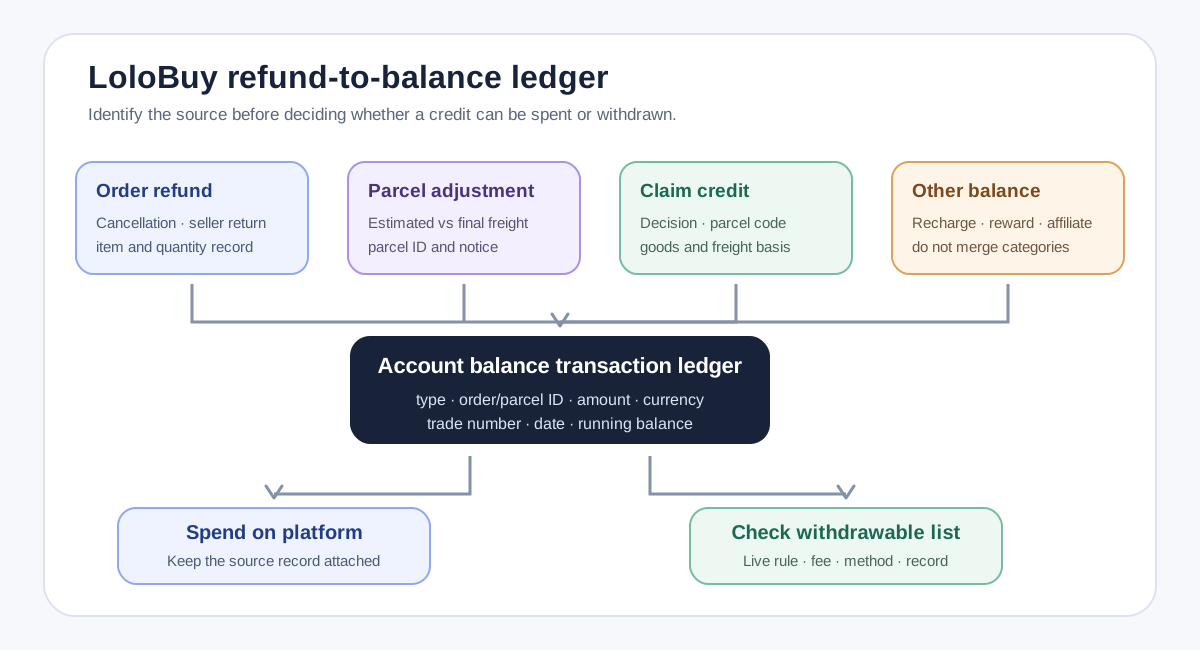
Use four categories in your sheet. An order refund reverses all or part of a Shopping Agent purchase. A parcel adjustment corrects estimated international freight after the final carrier charge is known. A compensation credit follows an approved loss or damage case. A manual recharge or supplemental payment adds money to cover a seller-price, Chinese domestic delivery or parcel-freight difference. The same account balance can contain several of these movements at once.
LoloBuy's current program labels transaction subjects including order refund, parcel refund, original-channel refund, order or parcel replenishment, balance recharge and balance withdrawal. Record the exact label shown, transaction number, related order or parcel ID, amount, currency, date and status. Do not write only ‘refund received.’ A precise row lets you match the credit to its cause and prevents a parcel overpayment from being mistaken for a seller refund that is still waiting for confirmation.
Map the order stage to the expected refund path+
Map the order stage to the expected refund path
LoloBuy's public cancellation page describes different paths by order status. It says a Verifying order can be cancelled in My Orders and refunded to LoloBuy balance, while a Processing order can be cancelled if the item has not been purchased. Once purchased, the shopping agent must request a seller refund. After domestic dispatch or warehouse arrival, seller approval, return transport and receipt by the seller can become part of the path. The page gives typical timings, but seller action and current account status still control the real case.
Build a timeline with request time, order status, agent response, seller acceptance, return tracking where applicable, seller receipt, platform credit and final balance entry. Do not start the clock from the date you first wanted a refund if the seller request was submitted later. If only some items are returned, reconcile quantities and unit amounts. A Return/Refund status proves a workflow exists; it does not prove the seller has paid or that the balance entry is final.
Keep seller refunds and parcel freight adjustments in different rows+
Keep seller refunds and parcel freight adjustments in different rows
A product refund belongs to the purchase order. An international freight refund belongs to the parcel. LoloBuy's parcel supplemental-payment page says estimated freight is collected first and the later carrier charge can produce either an overpayment refund or a request for the difference. That adjustment depends on the packed parcel and carrier billing, not on whether a seller accepted a product return. Link it to the parcel number, selected line, estimated amount, final amount and platform notice.
The order supplemental-payment page describes another stage: an already submitted purchase can require an extra payment after seller-price or Chinese domestic delivery changes. Keep the original product amount, seller freight and adjustment as separate fields. When a later credit arrives, identify whether it reverses that adjustment or a different charge. This prevents double counting and makes the true landed-cost calculation usable even when one account balance number combines activity from several orders and parcels.
Use the Bill page as the transaction source of truth+
Use the Bill page as the transaction source of truth
The current LoloBuy interface includes an account-balance summary, balance details and columns for income or expenditure, running balance, transaction type, transaction amount, time, channel and trade number. Copy those fields rather than estimating a refund from memory. Save a screenshot of the order or parcel before cancellation, the submitted request, the platform message and the final Bill row. If the amount differs, compare item quantity, discounts, coupons, domestic freight and any return charge before escalating.
Keep the original payment receipt as well. LoloBuy's payment interface says product prices in foreign currency are converted to CNY at the platform exchange rate and that payment-channel handling fees can contain a percentage and fixed component. The public interface does not establish one permanent rate or fee. US and European buyers should therefore record both the platform CNY amount and the amount posted by the card, wallet or bank in its billing currency. A balance credit can match in CNY while the eventual external refund differs after channel fees or currency conversion.
Spendable balance and withdrawable balance are not identical+
Spendable balance and withdrawable balance are not identical
LoloBuy's current withdrawal page has separate views for amounts available for withdrawal and withdrawal records. Its module loads a list of eligible balance entries and a live rule configuration. This structure matters: the account's headline balance is not proof that every component can be sent out through every method. Check which transaction appears in the available list, its maximum withdrawable amount, the supported receiving method and the current rule text.
Affiliate bonuses are the clearest reason not to merge categories. LoloBuy's public Bonus Withdrawal page says a bonus moved to LoloBuy account balance can be used for purchases on the platform. The current application also warns that an affiliate withdrawal to balance is for platform use and cannot be transferred out. That is not the same as a buyer refund from an order payment. Mark affiliate income, activity rewards and promotional balance separately so they are never presented as externally withdrawable cash without live confirmation.
Read the live withdrawal rule instead of copying an old fee+
Read the live withdrawal rule instead of copying an old fee
The current website has a dedicated Withdraw page, an application form, eligible-credit list and record statuses. It also warns that some channels do not support self-service withdrawal and directs users to online customer service for assistance. The interface contains general fee and arrival-time messages, while the withdrawal module separately fetches live channel rules, minimums, fees, currency and refund instructions. That is why this guide does not publish one fixed charge or processing window.
Before submitting, save the source balance entry, amount available, minimum and maximum, fee, net refund, currency, receiving method, expected route and rule text exactly as displayed. Verify that the receiving account belongs to you and that the details match the original payment or supported payout method. If the page says the order does not support withdrawal, do not route around the control with unrelated affiliate settings. Contact authenticated support with the Bill row and transaction number and request the applicable process in writing.
Compensation credits need their own evidence chain+
Compensation credits need their own evidence chain
LoloBuy's uninsured-parcel compensation page says customer service verifies a claim and then refunds approved compensation to the user's account. That credit should be tied to the claim number, parcel code, decision, amount and credit date. Do not merge it into a seller return simply because both appear in balance. Protection rules, excluded goods and evidence requirements determine the claim; purchase-return rules do not.
If the credited amount is lower than expected, compare it with the written decision and the route or Secure-Ship terms saved before shipment. Record product compensation and freight compensation separately where the decision does. Preserve the carrier certificate, transaction proof, unpacking evidence and support record from the original case. A clean trail lets support see whether the issue is claim assessment, balance posting or withdrawal eligibility instead of reopening every stage as one vague missing-refund complaint.
Reconcile in CNY and the buyer's billing currency+
Reconcile in CNY and the buyer's billing currency
For a US buyer, add columns for platform CNY, card or wallet USD, the provider's posted date and any separate fee. For a European buyer, use the actual billing currency—such as EUR, GBP, PLN or SEK—rather than labelling everything ‘EU.’ Preserve the payment provider's original authorization and settled amount. When money returns externally, match the provider reference and settlement date, not only the amount expected from a conversion calculator.
Exchange-rate movement can make the external amount look different even when the platform reverses the correct CNY value under its process. Do not call that difference a LoloBuy fee without evidence. First separate the platform credit, platform withdrawal fee shown at submission, payment-service fee shown on the record and bank or wallet conversion. Ask the responsible provider about its own component. This two-currency ledger gives support a reproducible question and protects the buyer from counting the same currency difference twice.
A practical LoloBuy refund and withdrawal checklist+
A practical LoloBuy refund and withdrawal checklist
At refund request, save the order or parcel status, selected items, quantities, paid amounts, reason and submission confirmation. During processing, record seller acceptance, return tracking, platform messages and requested supplemental payments. At balance credit, capture the Bill row, transaction type, trade number, amount, currency and running balance. Reconcile it against the original order, parcel adjustment or claim rather than against the headline balance alone.
Before withdrawal, open the current eligible-credit list and live rules. Verify the amount, fee, net result, method, account details and status-record location; contact authenticated support when self-service is unavailable. After submission, keep the withdrawal record and match the receiving-provider entry when it settles. This workflow cannot guarantee a seller refund, fee-free withdrawal or arrival date. It gives US and European buyers a traceable chain from purchase and balance credit to the final destination of the money—the evidence needed to resolve discrepancies without guessing.
Sources checked+
Sources checked
Material facts in this guide were checked against the following public sources. Access dates are shown so readers can distinguish the cited record from current platform, carrier and government rules.
- LoloBuy current web application — balance, payment and withdrawal interface labels — accessed 19 September 2026
- LoloBuy current balance-withdrawal module — eligible credits, rule configuration and records — accessed 19 September 2026
- LoloBuy Help Center — Cancelling or refunding Shopping Agent orders — accessed 19 September 2026
- LoloBuy Help Center — Supplemental payments and parcel freight differences — accessed 19 September 2026
- LoloBuy Help Center — Order supplemental payment after seller-price or domestic-freight changes — accessed 19 September 2026
- LoloBuy Help Center — Compensation method for uninsured lost or damaged parcels — accessed 19 September 2026
- LoloBuy Help Center — Affiliate bonus withdrawal rules — accessed 19 September 2026